A private tunnel, one tap away
Skryt wraps WireGuard's tunnel engine in a client that shows you what actually matters: where you're exiting, how fast it is, and whether you're protected.
Available for Android, iOS, Windows, macOS and Linux.
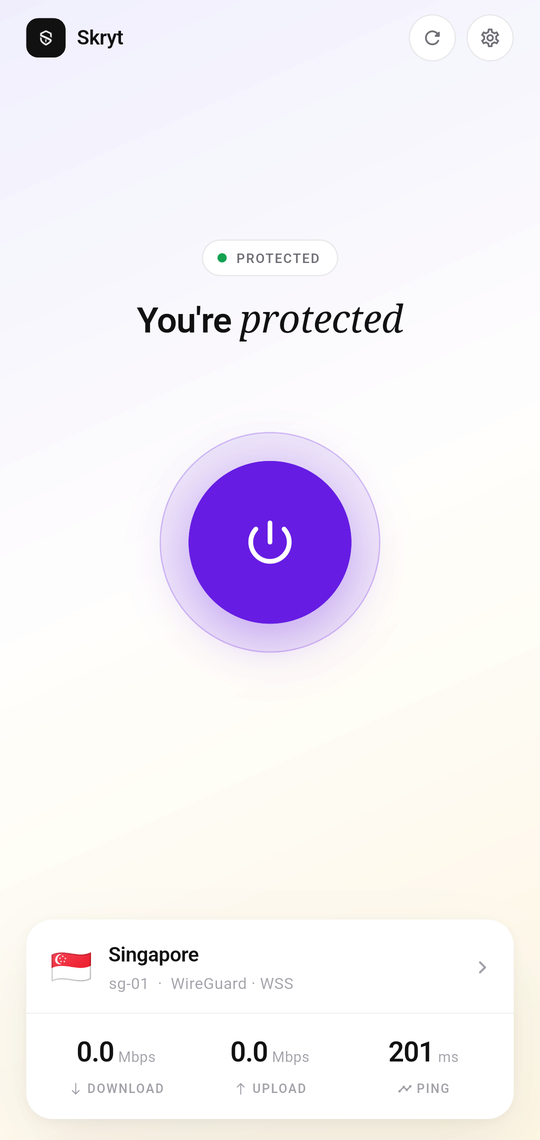
Skryt wraps WireGuard's tunnel engine in a client that shows you what actually matters: where you're exiting, how fast it is, and whether you're protected.
Available for Android, iOS, Windows, macOS and Linux.
No dashboards to learn. Open it, tap once, and get on with your day.
A single dial. It's white when you're off and lit when the tunnel is up — no reading required.
The same modern protocol the wider industry moved to — a lean codebase and quick reconnects.
Live download, upload and a ping measured from your device — not a number the server claims.
Choose the city your traffic leaves from, with each node's latency measured before you commit.
Pick your devices and your data. No tiers, no bundle you didn't ask for.
Skryt runs on a Stremit account — we'll create one with this address and bill it here. You'll get a sign-in link once payment goes through.
Opening secure checkout…
Billed by Stremit, who make Skryt. Cancel any time — access runs to the end of the period you paid for.
New phone, fresh install, or lost your key? Get a sign-in link.
Same app, same account, every device you own.
Every card above shows its real status — we don't link to a build that doesn't exist yet.